Notion for Small Business: Complete Irish Setup Guide
Quick answer: Notion is an all-in-one workspace that replaces 5-10 separate tools for Irish small businesses. Use it as a CRM (contact management), project tracker (replace Asana/Trello), knowledge base (internal docs), client portal (share deliverables), and meeting notes system. Cost: Free for solo users, €8/user/month for teams. Setup takes 3-5 hours for a complete business system.
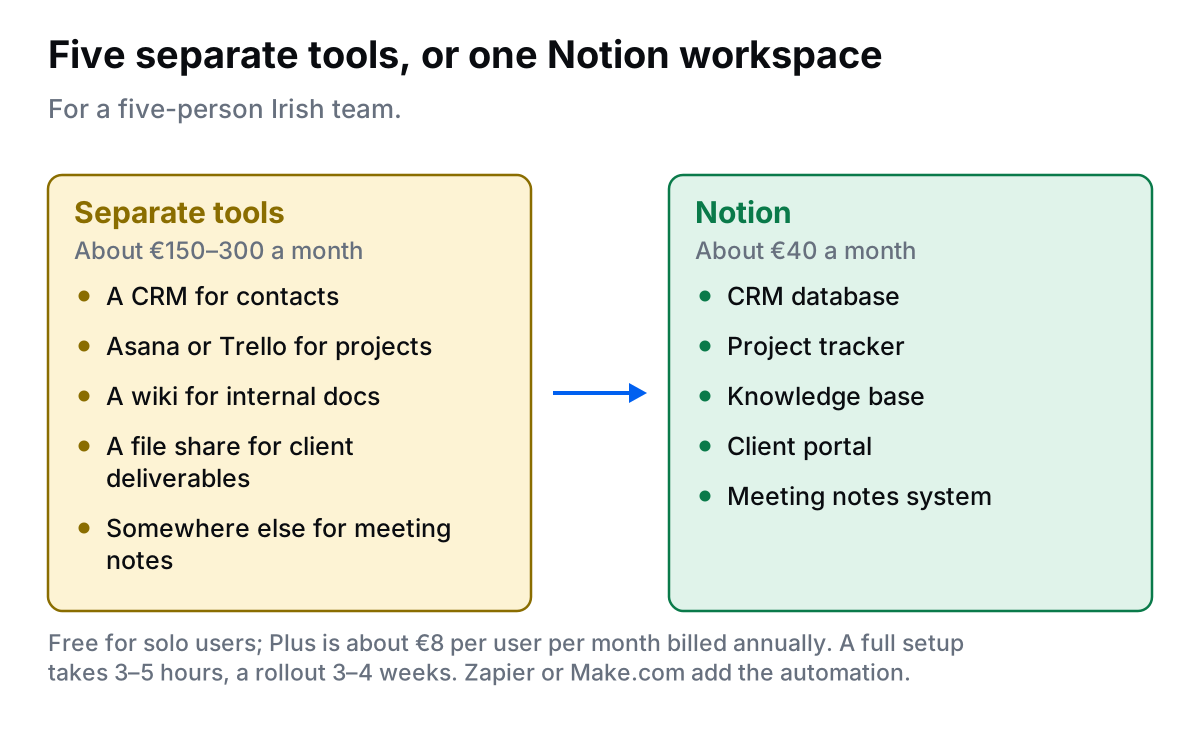
If your Irish business is juggling:
- Contacts in Excel spreadsheets
- Projects in email threads or Trello
- Documents scattered across Google Drive folders
- Meeting notes lost in notebooks
- Client updates sent via endless email chains
Notion consolidates all of this into one system. What follows is the layout I build for small Irish teams, database by database.
This guide shows exactly how to set up Notion for an Irish small business in 2026.
Why Irish Small Businesses Love Notion
Notion is the most flexible business tool available. It is a database, wiki, project manager, and CRM rolled into one.
Irish SMEs using Notion successfully:
- Marketing agencies: Client projects, deliverables, content calendars
- Consultancies: Client database, project tracker, knowledge library
- Design studios: Design briefs, client portals, creative workflows
- Tech startups: Product roadmap, sprint planning, company wiki
- Solo consultants: Everything in one place (CRM, projects, invoices, notes)
Why Notion vs. specialist tools?
- Cost: €8/user/month vs. €40-100/month for Asana + HubSpot + Confluence
- Flexibility: Build exactly what you need, not forced into templates
- Learning curve: Steeper initially, but once set up, easier for team adoption
5 Core Notion Systems for Irish Small Businesses
System 1: CRM Database (Contact & Deal Management)
Use Case: Track leads, clients, and opportunities in one place. Perfect for businesses managing <200 contacts.
Setup:
- Create new page: "CRM"
- Add database (full page): Name it "Contacts"
- Add properties:
- Name (Title)
- Company (Text)
- Email (Email)
- Phone (Phone, use +353 format)
- Status (Select: Lead / Qualified / Proposal Sent / Client / Lost)
- Deal Value (Number, format as EUR €)
- Next Action (Text)
- Next Follow-Up (Date)
- Source (Select: Website / Referral / LinkedIn / Event)
- Owner (Person, assign to team member)
- Create views:
- Kanban view by Status (visual pipeline)
- Table view (all contacts)
- Calendar view by Next Follow-Up (see upcoming actions)
Pro Tip: Add a "Last Contact" date property and filter by "Last Contact > 30 days ago" to find cold leads needing follow-up.
System 2: Project Management Tracker
Use Case: Manage client projects, internal initiatives, and deliverables. Replace Asana/Trello.
Setup:
- Create new page: "Projects"
- Add database: Name it "Active Projects"
- Add properties:
- Project Name (Title)
- Client (Relation to CRM Contacts database)
- Status (Select: Not Started / In Progress / Review / Complete)
- Start Date (Date)
- Deadline (Date)
- Project Manager (Person)
- Value (Number, format as EUR €)
- Priority (Select: Low / Medium / High / Urgent)
- Inside each project page, add:
- Brief / Scope section
- Task checklist (sub-items with assignees and due dates)
- Files / Assets section (embed Google Drive links or upload directly)
- Client Communication log
- Create views:
- Kanban by Status
- Calendar by Deadline
- Table grouped by Project Manager
Advanced: Use Notion formulas to calculate "Days Until Deadline" and auto-flag projects as overdue.
System 3: Knowledge Base (Company Wiki)
Use Case: Centralize SOPs, processes, templates, and company information. Stop answering the same questions repeatedly.
Setup:
- Create new page: "Knowledge Base" or "Company Wiki"
- Add sections (sub-pages):
- How We Work
- Client Onboarding Process
- Project Workflow
- Communication Guidelines
- Templates
- Proposal Template
- Meeting Agenda Template
- Client Brief Template
- Tools & Systems
- How to Use [Tool Name]
- Login Credentials (password-protected)
- Policies
- Holiday Policy (Irish public holidays included)
- Remote Work Policy
- Expenses Policy (mileage rates, etc.)
- How We Work
Pro Tip: Make templates "duplicable" so team members can copy them. Right-click page → Turn into template.
System 4: Client Portal (Shared Pages)
Use Case: Share project updates, deliverables, and documents with clients without email overload.
Setup:
- Inside each project page (from System 2), create a section: "Client View"
- Add:
- Project timeline / milestones
- Latest deliverables (embedded files or links)
- Meeting notes
- Feedback form (using Notion database or embedded Typeform)
- Share page with client:
- Click "Share" (top right)
- Option 1: Generate public link (anyone with link can view, no login required)
- Option 2: Invite client as guest (free, they can comment but not edit)
- Set permissions: Read-only for clients (unless you want them to comment)
Security Note: For sensitive client data (financial info, passwords), use password-protected pages or avoid Notion entirely. Notion is GDPR-compliant but not designed for highly sensitive data.
System 5: Meeting Notes Database
Use Case: Keep all meeting notes searchable and linked to clients/projects. Stop losing decisions in email threads.
Setup:
- Create new page: "Meeting Notes"
- Add database: Name it "All Meetings"
- Add properties:
- Meeting Title (Title, format: "Client Name - Date - Topic")
- Date (Date)
- Attendees (Person, multi-select)
- Client/Project (Relation to CRM or Projects database)
- Type (Select: Client Call / Internal / Strategy / Review)
- Inside each meeting note, use template:
- Attendees: [Names]
- Agenda: [Topics]
- Discussion: [Notes]
- Action Items: [Checklist with assignees]
- Next Meeting: [Date/time]
- Create views:
- Timeline view by Date (see all past/upcoming meetings)
- Table grouped by Client (all meetings per client)
Integration Tip: Use Zapier to auto-create Notion meeting note when Calendly booking is made or Zoom call ends.
Notion Automation for Irish Businesses
Notion has limited built-in automation, but you can use Zapier or Make.com to connect it to other tools.
5 Useful Automation Workflows:
- New HubSpot deal → Create Notion project page
- When deal closes in HubSpot, auto-create project in Notion with client details
- Calendly booking → Create Notion meeting note
- When meeting is booked, auto-create meeting note page with pre-filled attendee and date
- Gmail email → Add to Notion contact
- When you email a contact, auto-log email in their Notion CRM record
- Stripe payment → Update Notion project status
- When client pays invoice, auto-update Notion project status to "Paid - Ready to Start"
- Notion task due → Slack notification
- When task deadline is today, send Slack reminder to assignee
Setup: Zapier costs €20-50/month depending on automation volume. Make.com is slightly cheaper for complex workflows.
Cost Breakdown
| Plan | Monthly Cost | Best For |
|---|---|---|
| Free (Personal) | €0 | Solo consultants, freelancers |
| Plus (Teams) | €8/user/month | Small teams (2-20 people) |
| Business | €15/user/month | Growing companies (20-100 people) |
| Zapier (for automation) | €20-50/month | Optional (for advanced workflows) |
| Total (5-person team) | €40/month |
Cost Comparison:
- Notion only (5 users): €40/month
- Asana + HubSpot + Confluence (5 users): €150-300/month
- Savings: €110-260/month = €1,320-3,120/year
Want Help Setting Up Notion for Your Business?
I will build custom CRM, project tracker, wiki, and client portal in 1-2 weeks.
Not sure where to start? The free automation audit takes five minutes and shows the hours and euro you would get back.
Setup Roadmap: 4 Weeks
Week 1: Foundation & CRM
- Create Notion account (Plus plan for team)
- Build CRM database (contacts, properties, views)
- Import existing contacts from Excel/old CRM
- Invite team members, assign roles
Week 2: Projects & Knowledge Base
- Build project management database
- Create project page template
- Add first 3-5 active projects
- Start company wiki with top 5 most-asked-questions
Week 3: Client Portals & Meeting Notes
- Set up client portal pages for active projects
- Share with 1-2 pilot clients, gather feedback
- Build meeting notes database + template
- Log past 5-10 important meetings (for searchability)
Week 4: Automation & Optimization
- Connect Zapier for key workflows (Calendly → Notion, etc.)
- Train team on all systems (1-hour workshop)
- Gather feedback, adjust views/properties
- Roll out to all clients
FAQs
Is Notion free for Irish small businesses?
Yes. Notion's free plan includes unlimited pages and blocks for individuals. For teams, the Plus plan costs €8/user/month (billed annually) and includes unlimited file uploads, version history, and advanced permissions. Perfect for Irish SMEs with 2-20 people.
Can I use Notion as a CRM for my Irish business?
Yes. Notion databases work as lightweight CRMs. Create a contacts database with fields: name, company, email, phone (+353 format), deal value (€), status, and next action. Not as powerful as HubSpot/Pipedrive, but perfect for businesses managing <100 active leads.
How do Irish businesses use Notion for project management?
Create a projects database with task sub-items, client assignments, deadlines, and status tracking. Use kanban boards for visual workflow. Popular with Irish design agencies, consultancies, and marketing teams as a more flexible alternative to Asana or Monday.com.
Can clients access Notion workspaces?
Yes. Share specific pages as public links or invite clients as guests (free, does not count toward user limit). Irish agencies use this for client portals with project updates, deliverables, and shared documents. Clients do not need Notion accounts to view.
Is Notion GDPR compliant for Irish businesses?
Yes. Notion is GDPR-compliant with EU data processing agreements, encryption, and data export/deletion capabilities. Data is stored in US/EU servers. Suitable for Irish businesses managing client information under GDPR.
Final Thoughts
Notion is not just another productivity tool. It is a complete business operating system.
For Irish small businesses, it replaces 5-10 separate tools, costs €8-15/user/month, and takes 3-4 weeks to fully implement.
Start small: Build a CRM this week. Add projects next week. Grow from there.
Within a month, you will have one central system that your entire team uses, no more tools sprawl, no more lost information.
Ready to Build Your Notion System?
I will design custom databases, templates, and workflows for your Irish business in 1-2 weeks.