How to Set Up HubSpot CRM for an Irish SME
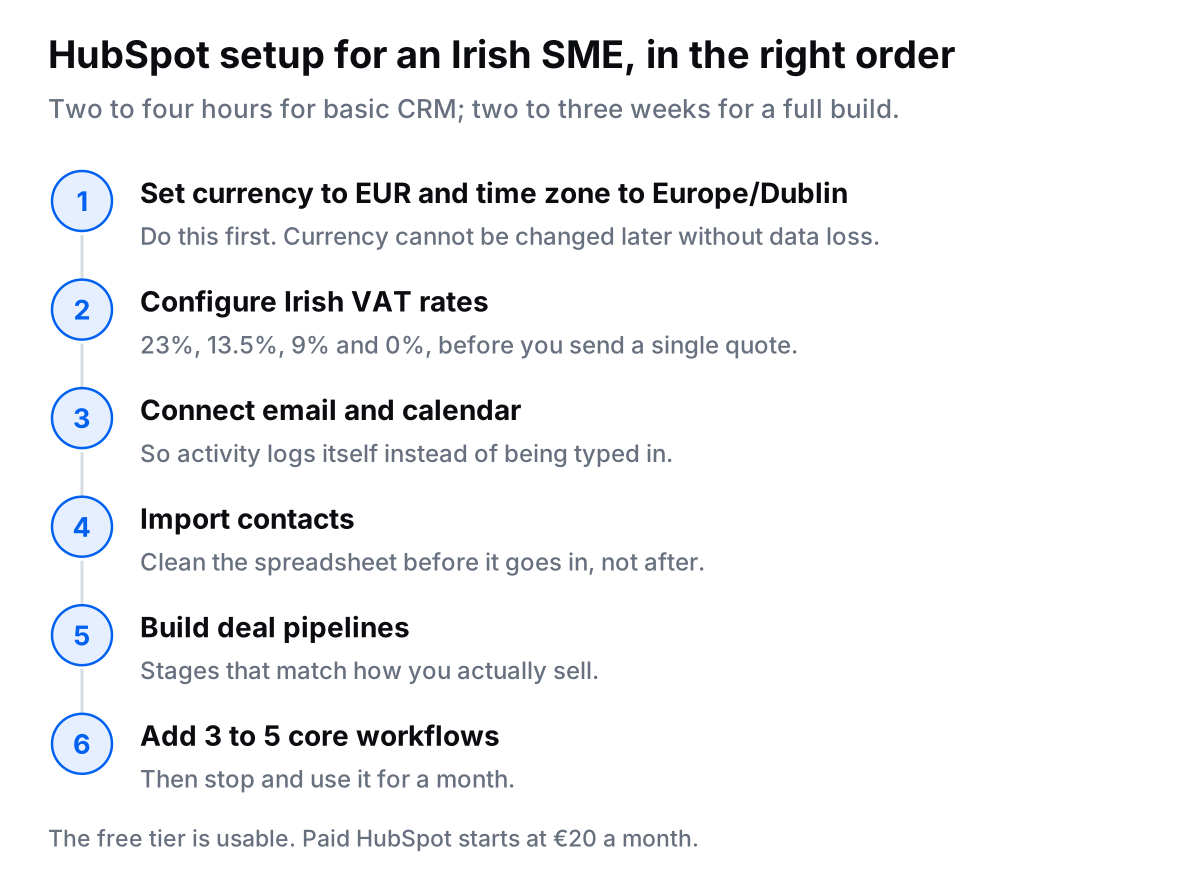
The complete answer: HubSpot setup for Irish SMEs takes 2-4 hours for basic CRM configuration, or 2-3 weeks for full implementation (CRM + automation + email marketing + reporting). Start with the free CRM, configure Irish VAT settings, connect email and calendar, import contacts, set up deal pipelines, and build 3-5 core automation workflows. Cost: €0-500/month depending on features needed.
If you are an Irish SME considering HubSpot, you are probably asking:
- "Is the free version actually useful or is it a trap?"
- "How do I set it up for Irish VAT rates and euro pricing?"
- "What automations should I build first?"
- "Can it integrate with Xero, Stripe, and other Irish business tools?"
This guide answers all of that. It is the same order I follow when I set HubSpot up for an Irish business.
This is the setup guide only. It assumes you have already picked HubSpot. If you have not, compare the market in the best CRM for small business in Ireland guide, or read the HubSpot vs Pipedrive head-to-head first. What follows is every step, from initial configuration to automation.
Why Irish SMEs Choose HubSpot
HubSpot is the most popular CRM for Irish SMEs for three reasons:
- Actually free tier: unlimited contacts, deals, tasks, and email integration (no credit card required)
- All-in-one: CRM, email marketing, automation, quotes, and reporting in one system
- Easy to use: non-technical teams can set it up and use it without training
Common Irish SME use cases:
- Sales teams: Track leads, deals, and pipeline in one place
- Marketing teams: Email campaigns, landing pages, lead capture forms
- Service businesses: Client management, project tracking, invoicing
- E-commerce: Abandoned cart emails, customer segmentation, lifecycle automation
HubSpot Setup: Step-by-Step for Irish SMEs
Step 1: Initial Account Setup (30 minutes)
Actions:
- Sign up at hubspot.com (choose "CRM Suite" → Free tier)
- Set company details:
- Company name
- Currency: EUR (€)
- Country: Ireland
- Time zone: Europe/Dublin (GMT/IST)
- Invite team members (Settings → Users & Teams)
- Set your company logo (Settings → Account Defaults → Branding)
Irish-specific: Make sure currency is set to EUR. This affects quotes, deals, and reporting. Cannot be changed later without losing data.
Step 2: Email & Calendar Integration (20 minutes)
Actions:
- Connect email: Settings → Integrations → Email (supports Gmail, Outlook, any IMAP)
- Enable email tracking (see when prospects open emails and click links)
- Connect calendar: Settings → Integrations → Calendar (Google Calendar or Outlook)
- Install HubSpot browser extension (Chrome/Edge) for Gmail/Outlook sidebar
What this does:
- All emails with contacts auto-log in HubSpot
- You can send tracked emails directly from Gmail/Outlook
- Meeting links (like Calendly) auto-add to calendar and HubSpot timeline
Step 3: Contact & Company Import (1-2 hours)
Actions:
- Export contacts from current system (Excel, old CRM, email contacts, etc.)
- Clean data:
- Remove duplicates
- Standardize phone numbers (+353 format)
- Fix email addresses
- Import to HubSpot: Contacts → Import → Upload CSV
- Map fields (First Name, Last Name, Email, Phone, Company, etc.)
- Review and confirm import
Pro Tip: HubSpot auto-enriches company data (industry, size, revenue) for Irish and international companies. Wait 24 hours after import and check, it saves manual research.
Common Irish Import Issues:
- Phone numbers: Use +353 followed by number (no leading zero). Example: +353871234567
- Duplicates: HubSpot matches on email. If importing from multiple sources, dedupe first.
- Company matching: HubSpot uses company domain to match. Ensure websites are included.
Step 4: Deal Pipeline Configuration (1 hour)
Actions:
- Go to Settings → Objects → Deals → Pipelines
- Create your sales pipeline stages. Example for Irish consultancy:
- Lead In (unqualified)
- Discovery Call Booked
- Proposal Sent
- Negotiation
- Closed Won
- Closed Lost
- Set stage probabilities (helps with forecasting):
- Lead In: 10%
- Discovery Call: 20%
- Proposal Sent: 50%
- Negotiation: 75%
- Closed Won: 100%
- Add required properties (e.g., "Expected Close Date" for Proposal Sent stage)
Irish Example Pipelines:
- B2B Services: Lead → Qualification → Proposal → Negotiation → Won
- E-commerce: Abandoned Cart → Reminder Sent → Discount Offered → Purchased
- Recruitment: Application → Phone Screen → Interview → Offer → Placed
Step 5: Irish VAT Configuration (30 minutes)
Actions:
- Go to Settings → Objects → Quotes → Configure Tax
- Add Irish VAT rates:
- Standard VAT: 23%
- Reduced VAT: 13.5%
- Second Reduced VAT: 9%
- Zero-rated: 0%
- Set default VAT rate (usually 23% for most Irish services/products)
- Add your Irish VAT number to company settings
- Configure quote template to display VAT breakdown
What this enables:
- Quotes show price + VAT automatically
- Deal values can be tracked ex-VAT or inc-VAT (set preference)
- Proper invoicing if using HubSpot payments
Irish VAT Rules Reminder:
- Irish B2C: Charge 23% VAT (standard rate for most services)
- Irish B2B: Charge 23% VAT (unless reverse charge applies for construction/property services)
- EU B2B (with VAT number): 0% (reverse charge, customer pays VAT in their country)
- Non-EU: 0% (export)
Step 6: Core Automations Setup (2-3 hours)
5 Must-Have Workflows for Irish SMEs:
Workflow 1: Lead Assignment
- Trigger: New contact created (from form, import, or manual)
- Actions:
- If company size > 50 employees → Assign to senior sales rep
- If company size < 50 → Assign to junior sales rep
- Send internal notification to assigned rep
Workflow 2: Welcome Email Sequence
- Trigger: Contact submits "Download Guide" form
- Actions:
- Send guide immediately
- Wait 2 days → Send email: "Did you find this useful?"
- Wait 5 days → Send email: "Here is how we can help"
- Wait 7 days → Assign to sales for follow-up
Workflow 3: Deal Stage Automation
- Trigger: Deal moves to "Proposal Sent"
- Actions:
- Create task: "Follow up in 3 days"
- Send proposal follow-up email after 3 days (if no response)
- Notify sales manager if deal sits in Proposal stage > 7 days
Workflow 4: Closed Won Automation
- Trigger: Deal marked "Closed Won"
- Actions:
- Send "Welcome to [Company]" email to client
- Create invoice in Xero (if integrated)
- Notify delivery team in Slack
- Add client to "Active Clients" list
Workflow 5: Re-engagement for Inactive Contacts
- Trigger: Contact has not engaged (opened email, visited website, replied) in 90 days
- Actions:
- Send re-engagement email: "Are you still interested?"
- If no response in 14 days → Remove from active marketing list
- If they click → Re-add to nurture sequence
Step 7: Integrations (1-2 hours)
Essential Integrations for Irish SMEs:
| Tool | Use Case | Setup |
|---|---|---|
| Xero | Auto-create invoices when deals close | Native integration (free) |
| Stripe | Accept payments via quotes/invoices | Native integration (free) |
| Calendly | Auto-log meetings in HubSpot timeline | Native integration (free) |
| Slack | Deal notifications, new lead alerts | Native integration (free) |
| Zapier | Connect non-native tools (Notion, Airtable, etc.) | €20-50/month |
Step 8: Reporting Dashboards (1 hour)
4 Essential Dashboards for Irish SMEs:
- Sales Dashboard
- Deals closed this month (€ value)
- Pipeline value by stage
- Average deal size
- Average time to close
- Deals by rep (if team)
- Marketing Dashboard
- New contacts this month
- Email open/click rates
- Top converting landing pages
- Lead sources (website, referral, LinkedIn, etc.)
- Revenue Dashboard
- Monthly recurring revenue (MRR) if applicable
- Revenue by client segment
- Revenue forecast (based on pipeline probability)
- Activity Dashboard
- Emails sent by rep
- Calls logged
- Meetings held
- Tasks completed vs. overdue
How to build: Reports → Dashboards → Create Dashboard → Add reports (drag and drop)
What does HubSpot cost for an Irish SME?
HubSpot's free CRM is €0 and covers unlimited contacts, deals and tasks, which is enough for most businesses under 20 people. Paid plans start at €20/month and the Professional tier is a large step up at €890/month.
Upgrade only when you need email sequences, landing pages or the branding removed. The full plan-by-plan breakdown, alongside Pipedrive, Zoho and Monday CRM, sits in the CRM pricing comparison.
Want Help Setting Up HubSpot?
I will configure your HubSpot CRM, build automation workflows, and train your team in 2-3 weeks.
Not sure what to automate first? Run the free automation audit. It takes five minutes and shows the hours and euro you would get back.
FAQs
Is HubSpot free for Irish SMEs?
Yes. HubSpot's free CRM includes unlimited contacts, deals, tasks, and basic email integration. Free tier is perfect for businesses <20 people. Paid plans start at €20/month (Starter) for email sequences, simple automation and custom reporting.
Does HubSpot work with Irish accounting software like Xero?
Yes. HubSpot integrates natively with Xero. When deals close in HubSpot, invoices auto-create in Xero. You can also sync contacts, track payment status, and display Xero data in HubSpot contact records.
Can HubSpot handle Irish VAT rates (23%)?
Yes. HubSpot quotes and payment tools support multiple VAT rates. You can configure 23% (standard), 13.5% (reduced), 9% (second reduced), and 0% (exports) for Irish businesses. VAT displays correctly on quotes and invoices.
How long does HubSpot setup take for an Irish SME?
Basic CRM setup: 2-4 hours. Full setup (CRM + automation + email marketing + reporting): 2-3 weeks. DIY is possible but most Irish SMEs hire a HubSpot partner for faster, cleaner implementation.
Is HubSpot GDPR compliant for Irish/EU businesses?
Yes. HubSpot is GDPR-compliant with EU data centres, consent management tools, data processing agreements, and double opt-in forms. Built-in features for managing data subject requests and deletion.
Final Thoughts
HubSpot setup does not have to be overwhelming.
Start with the free CRM. Connect email and calendar. Import contacts. Set up one deal pipeline.
That alone, doable in 3-4 hours, puts you ahead of the many Irish SMEs still running sales from Excel and email folders.
Add automation workflows and integrations over the next 2-3 weeks.
Within a month you will have a system that logs the admin for you and shows you where every deal stands.
Ready to Set Up HubSpot for Your Irish Business?
I will configure CRM, import contacts, build workflows, and set up integrations in 2-3 weeks.