Xero Automation Ireland: How to Automate Xero for a Small Business
To automate Xero in Ireland, connect your bank feed (AIB, Bank of Ireland or Revolut), turn on automatic invoice creation and payment reminders, use mobile receipt capture with OCR, sync Stripe or PayPal, set recurring invoices for retainers, and configure Irish VAT rates for one-click reporting. For anything Xero cannot do on its own, Zapier or Make.com links Xero to your CRM, forms and payment tools.
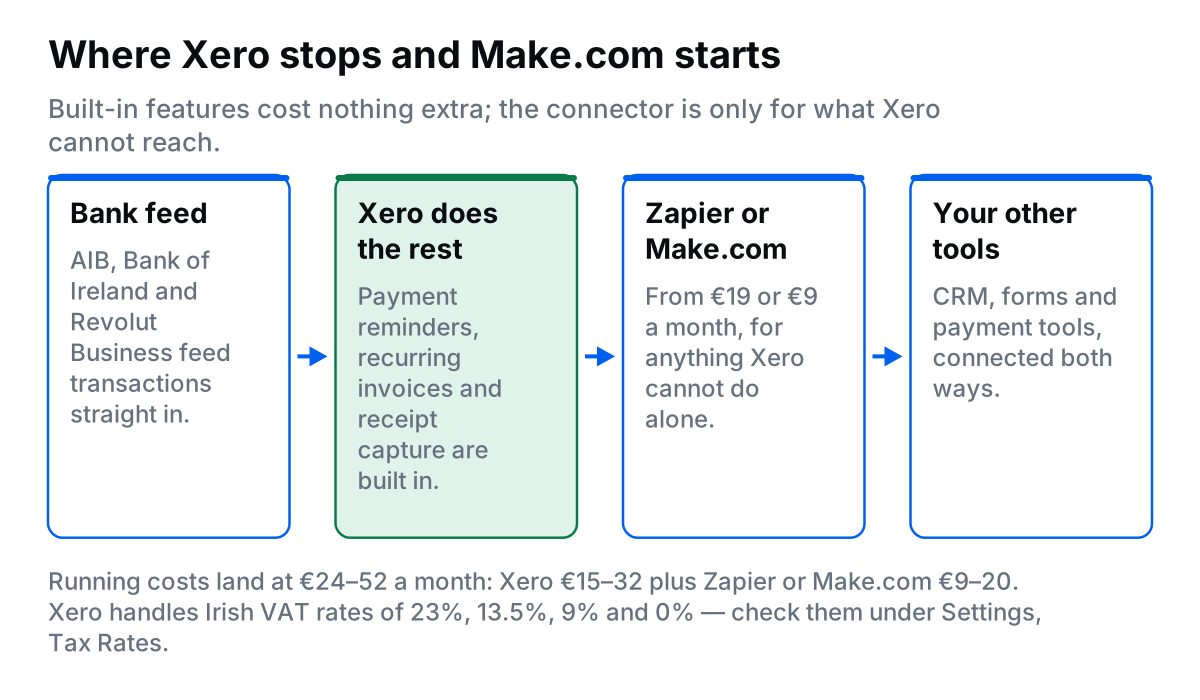
If you run an Irish business on Xero, you are probably losing a slice of every week to work that could run itself: creating invoices, chasing payments, reconciling the bank, filing receipts and preparing VAT returns. Xero is already powerful. Most small businesses use a fraction of what it does.
This guide covers both halves: the automations built into Xero, and the ones you add with Zapier or Make.com. Follow it yourself, or have me build it. I set Xero automations up for Irish businesses from Waterford.
What is in this guide:
- What Xero tasks can you automate?
- Seven Xero automations for Irish small businesses
- How do you connect Xero with Zapier?
- How do you connect Xero with Make.com?
- Xero automation ideas by industry
- Xero integrations available in Ireland
- Irish-specific setup: VAT, banks and ROS
- A three-week rollout plan
- How much does Xero automation cost?
What Xero tasks can you automate?
Almost every repetitive task in Xero can run without you. The ones worth doing first:
- Invoice creation from job completion: mark a job done in your CRM or project tool and the invoice is raised and sent.
- Payment reminders: a day 7, 14 and 21 chase sequence that stops the moment payment lands.
- Bank feeds and auto-reconciliation: transactions import daily and match themselves.
- Receipt capture: photograph a receipt, OCR reads it, the expense is categorised.
- Contact sync from your CRM: new customers in HubSpot or Pipedrive appear in Xero without retyping.
- Recurring invoices: retainer clients billed on schedule.
- VAT reporting: Irish rates tracked as you go, report ready when ROS is due.
- Monthly reports: cash flow and P&L emailed to you.
The bottom line
Manual Xero admin quietly eats a chunk of every week. Software costs €24-52/month. A done-for-you build starts from €500 for a single workflow, or €1,500-3,000 for a typical 3-5 workflow build. Whether that pays back depends on how many hours it is taking you now.
Seven Xero automations for Irish small businesses
1. Automatic invoice creation and sending
The problem: you finish the work, then create the invoice by hand and email it. Ten minutes each time, and most businesses wait two to five days to do it.
Trigger: job or project marked complete in your CRM or project tool.
Action: Xero invoice created and sent, with a Stripe or GoCardless payment link in the email.
Tools: your CRM + Zapier or Make.com + Xero + Stripe.
Time saved: 3-5 hours a month at 20-30 invoicesThe cash flow gain matters more than the time. Invoices go out within minutes of the job finishing instead of at the end of the week.
2. Payment reminder sequence
The problem: an invoice goes 14 days overdue, you forget to chase, cash flow suffers.
The sequence:
- Day 7: friendly reminder with a payment link.
- Day 14: second reminder noting the invoice is overdue.
- Day 21: firmer note requesting payment, flagged for manual follow-up.
- Day 30: escalated to you for a phone call.
Tools: Xero built-in reminders, or Zapier/Make.com for custom sequences.
How to set it up in Xero: Settings, then Reminders, then set invoice reminders with your own wording.
Time saved: 2-3 hours a month3. Receipt capture (snap and done)
The problem: a shoebox of receipts and two hours of typing at month end.
How it works: photograph the receipt in the Xero mobile app. OCR reads the amount, date and merchant. Xero suggests the category from your history. You approve with one tap.
Tools: Xero mobile app, built in, no extra cost.
Irish tip: it handles € amounts and Irish VAT formats, and categories match the Irish chart of accounts.
Time saved: 2-4 hours a month4. Bank feed and auto-reconciliation
The problem: month end and four to six hours matching bank transactions by hand.
How it works: connect your Irish bank to Xero. Transactions import daily, Xero suggests matches from past categorisation, and recurring items such as rent and subscriptions reconcile themselves once you set bank rules.
Tools: Xero bank feeds, free and built in.
Irish banks supported: AIB (direct feed), Bank of Ireland (direct feed), Revolut Business (direct integration), N26 Business (direct integration), Permanent TSB (via Yodlee), Ulster Bank (via Yodlee, limited).
Time saved: 3-5 hours a month5. Stripe and PayPal auto-sync
The problem: card payments logged by hand, fees in the wrong category, payouts that never match the bank.
How it works: connect Stripe or PayPal to Xero. Sales import as invoices, fees post as expenses, payouts reconcile to the bank account.
Tools: native Stripe or PayPal integration, or A2X (€19-99/month) for e-commerce volume.
Irish VAT: tracks 23% on Irish sales and 0% on exports and intra-EU B2B with a VAT number.
Time saved: 2-4 hours a month6. Recurring invoices for retainers
The problem: five to ten retainer clients, the same invoice typed out every month.
How it works: set a repeating invoice template and Xero creates and sends it on schedule. Add GoCardless if you want the client charged automatically.
How to set it up: Business, then Invoices, then New Repeating Invoice, then set the schedule.
Time saved: 1-2 hours a month7. VAT reporting and weekly cash flow
The problem: three to four hours pulling reports every VAT period, and no clear view of cash in between.
How it works: Xero tracks VAT as you post, so the report for ROS is one click. Separately, a scheduled Zapier or Make.com scenario can email you a Monday morning cash flow summary: money in, money out, outstanding invoices, upcoming bills and a four-week forecast.
Time saved: 3-4 hours per VAT period, plus an hour a weekHow do you connect Xero with Zapier?
Zapier is the most common way to connect Xero to the rest of your stack.
Step by step: your first Xero Zap
- Create a Zapier account at zapier.com. There is a free tier; paid plans start around €19/month.
- Click "Create Zap".
- Choose your trigger app: HubSpot, Typeform, Google Sheets and so on.
- Select Xero as the action app.
- Connect your Xero account and authorise Zapier.
- Choose the action: Create Invoice, Create Contact, and so on.
- Map your fields so each piece of data lands in the right place.
- Test it with one real record.
- Turn it on.
Popular Zapier and Xero recipes for Irish businesses:
- New Typeform submission → create Xero invoice
- HubSpot deal won → create Xero contact and invoice
- Stripe payment received → mark Xero invoice as paid
- New Calendly booking → create Xero contact
- New Shopify order → create Xero invoice
How do you connect Xero with Make.com?
Make.com (formerly Integromat) costs less and handles multi-step logic better. It suits anything with branches or high volume.
Step by step: your first Xero scenario
- Create a Make.com account at make.com. Free tier available, paid from €9/month.
- Click "Create a new scenario".
- Add your trigger module.
- Add the Xero module.
- Connect and authorise your Xero account.
- Choose the Xero action: Create an Invoice, Create a Contact, and so on.
- Map your data between modules.
- Run once to test.
- Set the schedule: every 5, 15 or 60 minutes.
Choose Make.com over Zapier when:
- You need if/then branches.
- You process high volumes, where Make.com is cheaper per operation.
- You need to transform data between steps.
- Budget is tight. Make.com is roughly half the price.
Want this built rather than wired up yourself?
I build Xero automation for Irish small businesses, from €500 for a single workflow. Check the numbers first with the automation ROI calculator, or see what a business automation consultant would set up for you.
Xero automation ideas by industry
Tradespeople: plumbers, electricians, builders
- Invoice on job photo upload: the completed-job photo triggers an invoice with the job details.
- Quote follow-up sequences: automatic reminders to clients who have not accepted a quote.
- Supplier payment scheduling: approved supplier invoices paid on the 20th.
- Mileage to expenses: mileage logged in an app creates the Xero expense.
Salons and clinics
- Invoice after appointment: a completed appointment in Fresha or Cliniko raises the invoice.
- Package and membership tracking: invoices for package payments, with sessions remaining tracked.
- Product sales from the till: retail sales logged in Xero from your point of sale.
- Cancellation fees: late cancellations trigger the fee invoice.
E-commerce
- Shopify order to Xero invoice: every sale creates an invoice. Use A2X for full reconciliation at volume.
- Inventory cost tracking: purchase orders update cost of goods sold.
- Supplier payments on stock arrival.
- Refund processing: Shopify refunds create Xero credit notes.
Professional services: consultants, agencies, accountants
- Time tracking to invoicing: hours in Toggl or Harvest added to draft invoices.
- Retainer billing: monthly invoices created and sent on the 1st.
- Milestone invoicing: a project hitting 50% in Asana or Monday triggers a progress invoice.
- Expense recharging: client expenses added to the next invoice.
Xero integrations available in Ireland
| Category | App | What it does |
|---|---|---|
| CRM | HubSpot | Sync contacts and deals, create invoices from closed deals |
| CRM | Pipedrive | Sync contacts, create invoices when deals are won |
| Payments | Stripe | Auto-reconcile card payments, sync fees as expenses |
| Payments | GoCardless | Direct debit collection and auto-reconciliation |
| E-commerce | Shopify | Sync orders, handle refunds, track inventory costs |
| E-commerce | WooCommerce | Full order sync, as with Shopify |
| Booking | Calendly | Create contacts when meetings are booked |
| Booking | Fresha | Salon appointments sync to invoices |
| Project | Asana | Invoice on project completion |
| Project | Monday.com | Create invoices from project milestones |
| Time tracking | Toggl | Sync billable hours to Xero invoices |
| Time tracking | Harvest | Full time-to-invoice workflow |
| Banking | AIB | Direct bank feed, built into Xero |
| Banking | Bank of Ireland | Direct bank feed, built into Xero |
| Banking | Revolut Business | Direct integration, real-time sync |
Irish-specific setup: VAT, banks and ROS
Irish VAT setup
- Settings, then Tax Rates: check 23%, 13.5%, 9% and 0% are present.
- Settings, then Organisation Settings: add your Irish VAT number.
- Settings, then Tax Settings: enable EU VAT if you trade across the EU.
The standard rate is 23%. Reduced 13.5% covers fuel, electricity and building services. Second reduced 9% covers newspapers and sports facilities. Zero covers exports and intra-EU B2B with a valid VAT number.
Irish bank feed problems
- Revolut Business connects instantly and free if your bank will not.
- Otherwise import CSV statements weekly.
- Yodlee, Xero's feed provider, covers most Irish banks but can lag.
ROS VAT filing
Xero does not submit to Irish Revenue directly. The process:
- Generate the VAT report in Xero.
- Log into ROS.
- Enter the T1, T2, T3 and T4 values from the Xero report.
- Submit. It takes about five minutes.
A three-week rollout plan
Week 1: foundation
- Connect your Irish bank feed.
- Connect Stripe or PayPal if you use them.
- Install the Xero mobile app for receipt capture.
Week 2: invoicing and payments
- Set up recurring invoices for retainer clients.
- Turn on automated payment reminders.
- Add payment links to your invoice templates.
Week 3: advanced automation
- Connect your CRM or project tool with Zapier or Make.com.
- Build the automatic invoice creation workflow.
- Set bank rules for recurring expenses.
How much does Xero automation cost?
Running costs first:
| Tool | Monthly cost |
|---|---|
| Xero (Starter or Standard) | €15-32 |
| Bank feeds (Irish banks) | €0, included |
| Receipt capture | €0, use the Xero app |
| Zapier or Make.com | €9-20 |
| GoCardless (optional) | 1% per transaction |
| Total | €24-52/month |
Then the build:
| Option | Setup cost | Best for |
|---|---|---|
| DIY with Zapier | €0, your time | Owners comfortable with software |
| DIY with Make.com | €0, your time | Tight budgets, complex workflows |
| Done for you | From €500 for one workflow, €1,500-3,000 for 3-5 | Busy owners who want it right first time |
Whether it pays back is arithmetic, not faith: multiply the hours you spend now by what an hour of your time is worth, then compare. The automation ROI calculator does it for you.
Frequently asked questions
How do I automate Xero for my Irish business?
Use these seven: automatic invoice creation and sending, payment reminders at day 7, 14 and 21, mobile receipt capture with OCR, bank feed auto-reconciliation for AIB, Bank of Ireland and Revolut, Stripe or PayPal sync, recurring invoices for retainer clients, and Irish VAT tracking at 23%, 13.5% and 9% for one-click reporting. Together they take most of the monthly accounting admin off your desk.
How much does Xero automation cost?
Software runs €24-52 a month: Xero at €15-32 plus Zapier or Make.com at €9-20. Bank feeds and receipt capture are included at no extra cost. A done-for-you build starts from €500 for a single workflow, or €1,500-3,000 for a typical 3-5 workflow build.
What Irish banks work with Xero bank feeds?
Xero bank feeds work with AIB (direct feed), Bank of Ireland (direct feed), Permanent TSB (via Yodlee), Revolut Business (direct integration), N26 Business (direct integration) and Ulster Bank (via Yodlee, limited). Revolut Business gives the fastest and most reliable connection for Irish businesses.
Do I need technical skills to automate Xero?
No, not for the basics. Payment reminders, recurring invoices, receipt capture and bank feeds are built into Xero and need no technical skill. Zapier and Make.com workflows need moderate comfort with software. If you can use spreadsheets, you can build a simple one. For multi-step or branching workflows, get them built for you.
Can I connect Xero with HubSpot?
Yes. Connect Xero with HubSpot using Zapier, Make.com or the native integration in the HubSpot marketplace. When a deal closes in HubSpot, a contact and invoice are created in Xero, which removes the double data entry between the two systems.
Will my Irish accountant be OK with Xero automation?
Yes. Irish accountants prefer clean, automated Xero files. Automation reduces errors and makes their job easier, and many accountants recommend these setups to their clients. Cleaner books often mean lower accounting fees.
Is Xero automation GDPR compliant?
Yes. Xero is GDPR compliant and stores data in EU data centres. The integrations named here, including Zapier, Make.com and Stripe, are also GDPR compliant. Check the data processing terms of any tool before you connect it to customer data.
Ready to automate Xero?
Start with bank feeds and receipt capture this week. Add payment reminders and recurring invoices next. If you would rather have the whole thing built, I do Xero automation projects from €500.