Monday.com Automation for Irish SMEs: Complete Guide
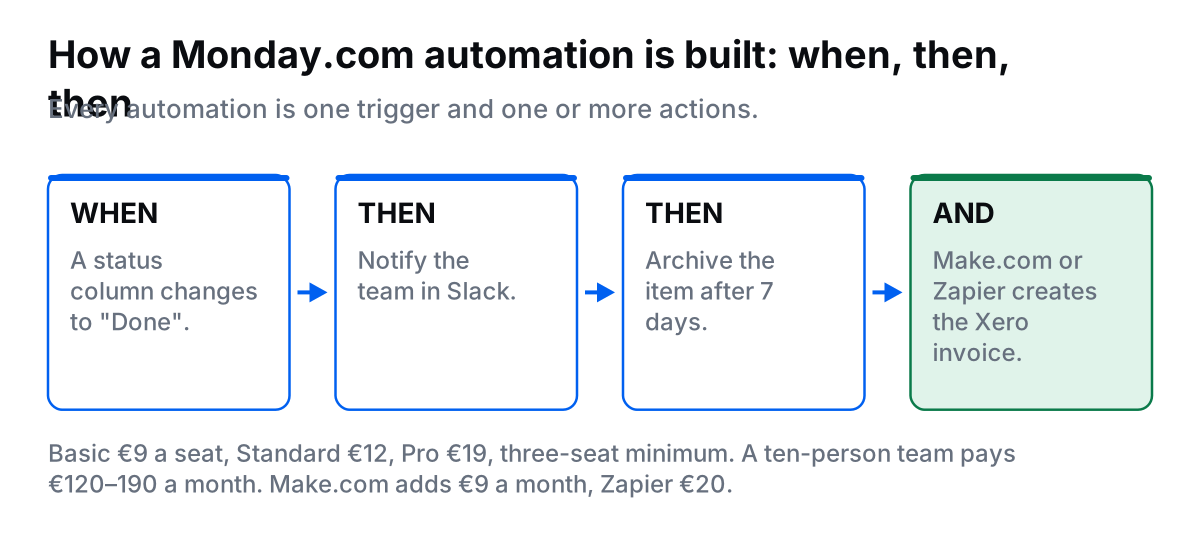
To use Monday.com effectively for Irish businesses: (1) Set up boards for key workflows (Client Projects, Sales Pipeline, Marketing Calendar), (2) Configure automations using when-then logic (when status changes to "Done", then notify team in Slack and archive item after 7 days), (3) Create integrations with Slack, Gmail, Google Drive, and Xero via Make.com or Zapier, (4) Use board templates for recurring processes (client onboarding, content production, sales process), (5) Set up dashboards combining multiple boards for leadership visibility, and (6) Train team on visual colour-coded workflows. Automation takes the status-update chasing off your plate, and the colour-coded board shows where work is stuck without anyone having to report it.
If you've tried Trello (too simple) and Asana (too complex), Monday.com might be your Goldilocks solution: visual boards like Trello, but powerful enough for complex workflows like Asana.
This guide shows you how to set up Monday.com for Irish SMEs, with automation, integrations, use cases, and real examples.
Why Monday.com for Irish Teams?
Monday.com is a visual work operating system (not just project management):
- Highly visual: Color-coded status columns, visual timeline, board views
- Infinitely customisable: Create any workflow (projects, CRM, HR, operations)
- Strong automation: 250-25,000 automations/month depending on plan
- Great for collaboration: Comments, mentions, file sharing, updates
- Multiple views: Board, timeline, calendar, chart, map, workload
Best for: Irish SMEs (10-50 people) wanting visual, flexible workflows across departments
Monday.com Pricing (2026)
| Plan | Price/Seat/Month | Key Features |
|---|---|---|
| Basic | €9 (min 3 seats) | Unlimited boards, 200+ templates, mobile app, 5GB storage |
| Standard | €12 (min 3 seats) | Timeline, calendar, 250 automations/month, integrations, 20GB storage |
| Pro | €19 (min 3 seats) | 25,000 automations/month, time tracking, private boards, 100GB storage |
| Enterprise | Custom | 250,000+ automations, advanced security, dedicated support |
Recommendation:
- 3-10 people: Start with Standard (€12/seat) for automations
- 10-30 people: Pro (€19/seat) for unlimited automations and time tracking
- 30+ people: Enterprise for advanced features
Cost for 10-person Irish team: €120/month (Standard) or €190/month (Pro)
Setting Up Monday.com: 4-Week Plan
Week 1: Foundation & First Boards
Day 1-2: Workspace Setup
- Create Monday.com account (choose Standard or Pro plan)
- Add company logo and workspace name
- Invite team members (use company emails)
- Explore board templates (200+ available)
Day 3-5: Create First 2-3 Boards
Start with core workflows. Don't try to do everything at once.
Board 1: Client Projects
- Groups (sections): Active Projects, On Hold, Complete
- Columns: Client Name, Status (Working On It / Stuck / Done), Owner, Due Date, Priority, Budget
- View: Board view (main), Timeline view (for planning)
Board 2: Sales Pipeline
- Groups: Leads, Qualified, Proposal Sent, Negotiation, Closed Won, Closed Lost
- Columns: Company, Contact Email, Deal Value, Close Date, Status, Next Action
- View: Board view (main), Calendar view (by close date)
Board 3: Marketing Calendar
- Groups: Blog Posts, Social Media, Email Campaigns, Ads
- Columns: Title, Status, Channel, Publish Date, Owner, Performance Metrics
- View: Calendar view (main), Board view (for status)
Week 2: Automations
Monday.com automations use simple when-then logic (no coding).
Essential Automations for Irish Teams:
1. Status Change Notification
- When: Status changes to "Stuck"
- Then: Notify board owner and item owner
- Benefit: Immediate visibility into blockers
2. Auto-Assign Based on Group
- When: Item created in "Design" group
- Then: Assign to Sarah (designer), set due date +5 days
3. Overdue Item Alert
- When: Due date arrives and status is not "Done"
- Then: Send email to item owner, notify manager in Slack
4. Auto-Archive Completed Work
- When: Status changes to "Done"
- Then: Wait 7 days, then archive item
- Benefit: Keeps boards clean automatically
5. Move Item Between Boards
- When: Status changes to "Closed Won" on Sales board
- Then: Create item on Client Projects board, assign to delivery team
- Benefit: Clean handoff from sales to delivery
6. Recurring Item Creation
- When: Every Monday at 9am
- Then: Create item "Weekly team standup" in Internal Tasks board
7. Send Slack Update
- When: Item moves to "Complete" group
- Then: Send message to #project-updates Slack channel with item details
Setup: Click item → Automate → Choose recipe or create custom
Automation Limits: Standard plan = 250/month. Pro = 25,000/month. Monitor usage: Settings → Usage
Week 3: Integrations
Key Integrations for Irish Businesses:
Monday.com + Slack
- Get board updates in Slack channels
- Create Monday items from Slack messages
- Setup: Integrations → Slack → Connect account
Monday.com + Gmail
- Create items from emails
- Send item updates via email
- Setup: Install Monday for Gmail Chrome extension
Monday.com + Google Drive
- Attach files from Google Drive to items
- Auto-create Drive folders for new projects
- Setup: Integrations → Google Drive → Connect
Monday.com + Xero (via Make.com)
- Workflow: When item moves to "Complete" group → Create Xero invoice
- Setup: Make.com account (€9/month) → Connect Monday + Xero → Create scenario
- Benefit: Automatic invoicing when projects finish
Monday.com + Calendly
- New Calendly booking → Create item on Sales board
- Setup: Via Zapier (€20/month)
Monday.com + Zoom
- Create Zoom meetings directly from Monday items
- Attach meeting links and recordings
- Setup: Integrations → Zoom → Connect
Week 4: Dashboards & Templates
Create Dashboards
Dashboards combine data from multiple boards into one view (great for leadership).
Example Dashboard for Irish SME:
- Active Projects Chart: Shows all projects by status
- Sales Pipeline Value: Total value of deals by stage
- Team Workload: Items per person (identify bottlenecks)
- Overdue Items: List of everything overdue
- This Week's Tasks: All items due in next 7 days
Setup: Create Dashboard → Add widgets → Select boards and data
Save Board Templates
For recurring workflows, save boards as templates (saves 30-60 minutes per new project).
Template 1: Client Project Delivery
- Pre-defined groups: Discovery, Design, Development, Launch
- Standard columns: Status, Owner, Due Date, Priority
- Pre-built automations: Status notifications, due date reminders
Template 2: Content Production
- Groups: Ideas, In Progress, Review, Published
- Columns: Title, Content Type, Publish Date, Channel, Performance
How to save: Board menu → More actions → Save as template
Common Use Cases for Irish Businesses
1. Client Project Management
Setup: Board with columns for Client, Status, Timeline, Budget, Deliverables
Automation: Status change to "Client Review" → Email client with project link
Benefit: Full project visibility, automatic client updates
2. Sales CRM
Setup: Board with groups for each sales stage, columns for Deal Value, Close Date, Contact
Automation: Move to "Closed Won" → Create project board, send welcome email, create Xero invoice
Benefit: Visual pipeline, clean sales-to-delivery handoff
3. Marketing Campaign Tracking
Setup: Calendar view of all campaigns, columns for Channel, Budget, Performance Metrics
Automation: Campaign launch date arrives → Send Slack reminder to marketing team
4. HR Recruitment
Setup: Kanban board with groups for Applied, Phone Screen, Interview, Offer, Hired
Automation: Move to "Interview" → Schedule Zoom meeting, notify interviewer
5. Product Roadmap
Setup: Timeline view with features, columns for Priority, Owner, Release Date
Automation: Feature complete → Notify product team, move to "Released" group
Need Help Setting Up Monday.com?
I'll create boards, configure automations, set up integrations, and train your Irish team in 2-3 weeks.
Want to see what it is actually worth first? Try the free automation audit. Five minutes to see the hours and euro on the table.
Monday.com vs. Competitors
| Tool | Best For | Price |
|---|---|---|
| Trello | Simple task boards, small teams | €5/user |
| Monday.com | Visual workflows, highly customisable | €12-19/user |
| Asana | Complex dependencies, Gantt charts | €11-25/user |
| ClickUp | All-in-one, power users | €7-19/user |
Choose Monday.com if: You want visual, colour-coded workflows, need high customisation, prefer board-style over list-style, want strong automation
Tips for Irish Teams
1. Start Simple
Don't create 20 boards on Day 1. Start with 2-3 core workflows. Add more as team adopts.
2. Use Color-Coding
Status columns with colours are Monday's strength. Use consistently: Green = Done, Orange = Working On It, Red = Stuck.
3. Monitor Automation Usage
Standard plan = 250 automations/month. If you hit limit, upgrade to Pro (25,000/month) or optimise automations.
4. Train Team on Mobile App
Monday's mobile app is excellent. Team can update status, add comments, check timelines on the go.
5. Archive Old Boards
Once projects complete, archive boards to keep workspace clean. Archived boards are still searchable.
Frequently Asked Questions
How do I automate Monday.com for my Irish business?
To automate Monday.com for Irish businesses: (1) Set up boards for key workflows (Projects, Sales, Marketing), (2) Configure automations using when-then logic (when status changes, then notify team), (3) Create integrations with Slack, Gmail, Xero via Make.com/Zapier, (4) Use templates for recurring work (client onboarding, content production), (5) Set up dashboards for leadership visibility, and (6) Train team on mobile app. Monday.com automation takes the status-update chasing off your plate, data entry, and coordination.
How much does Monday.com cost for Irish SMEs?
Monday.com pricing for Irish SMEs: Basic (€9/seat/month, min 3 seats) includes unlimited boards, 200+ templates, mobile app. Standard (€12/seat/month) adds timeline, calendar, automations (250/month), integrations. Pro (€19/seat/month) adds 25,000 automations/month, time tracking, private boards. For a 10-person Irish team: €90-190/month depending on automation needs. Most Irish SMEs need Standard tier for sufficient automations and integrations.
Can Monday.com integrate with Xero for Irish accounting?
Yes, Monday.com integrates with Xero via Make.com or Zapier. Workflow: When item moves to 'Complete' status on Monday board, create Xero invoice with item details (client, amount, description). Requires Make.com (€9/month) or Zapier (€20/month). Removes the manual invoice step-based businesses. Bidirectional sync keeps client data consistent across both platforms.
What is the difference between Monday.com and Asana?
Monday.com is more visual and customisable with board-style interface. Asana is better for complex project dependencies and timelines. Monday.com: Highly visual, colour-coded boards, unlimited customisation, strong automation. Asana: Better for Gantt charts, task dependencies, workload management. For Irish SMEs: Choose Monday.com for visual teams wanting flexible workflows (€12-19/user). Choose Asana for complex project planning (€11-25/user).
What are the best Monday.com use cases for Irish businesses?
Best Monday.com use cases for Irish businesses: (1) Client project tracking (Lead → Active → Complete with status updates), (2) Content production pipeline (Ideas → Writing → Design → Published), (3) Sales CRM (Prospect → Proposal → Negotiation → Closed), (4) Marketing campaign management (Planning → Execution → Analysis), (5) Product roadmap (Backlog → Planned → In Progress → Released), (6) HR recruitment (Applied → Interview → Offer → Hired). All use cases benefit from visual boards, automations, and team collaboration features.
Final Thoughts
Monday.com is powerful, visual work management software for Irish teams that want flexibility and customisation.
Start with Standard plan (€12/seat). Create 2-3 core boards. Add automations. Build dashboards.
Give it a month of consistent use and the status meetings largely stop being necessary.
Ready to Implement Monday.com for Your Irish Team?
I'll set up boards, automations, integrations, dashboards, and train your team in 2-3 weeks.