Claude for Small Business: what a setup looks like week by week
A Claude for Small Business install runs to a four-week shape: a free call and preparation first, one day on-site to set up the team account, connections and the first workflow, a second week bedding that workflow into real work with projects and knowledge, a third week where staff habits form, and from week four one new or improved workflow each month. Setup is from €1,750, then from €600 a month, with Claude licences paid to Anthropic directly.
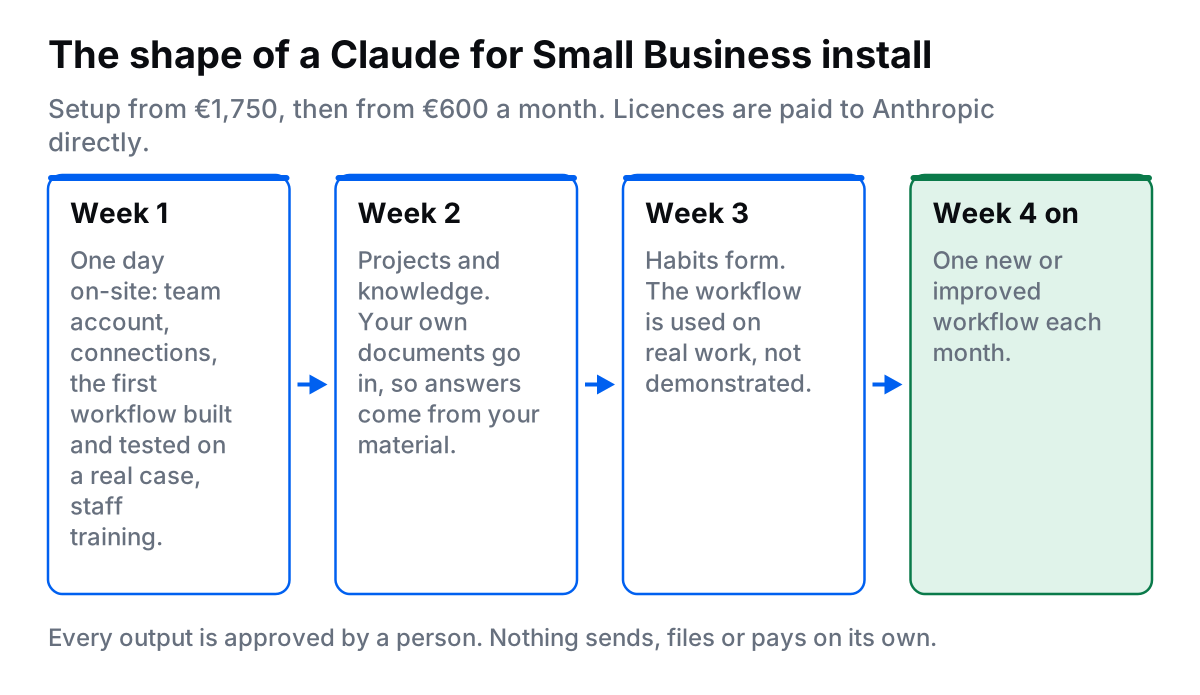
The reason to describe it week by week is that the failure mode of AI tools is not technical. It is that nobody uses them. An account with nothing connected and no assigned job dies in a fortnight. What follows is what actually happens, and what is asked of you. If you want to know whether your business is ready before reading further, take the two-minute Claude readiness check.
What has to be true before week one?
The install suits Irish businesses with roughly three to thirty staff, where several people spend hours a week on email, documents and chasing. Accountancy practices, solicitors, clinics, contractors, agencies and letting agents are the usual shape. It works best if you already run on Google Workspace or Microsoft 365.
Three things need to be in place before install day, and they are the same three every time:
- An admin who can grant access. Somebody with the authority to connect your email and files, or to sit beside me while it happens.
- One job that is clearly costing you hours. Chasing unpaid invoices, answering the same twenty email questions, or reading long documents to find the parts that need a decision.
- Something written down. A price list, a procedure, previous quotes, standard replies. If nothing is written down anywhere, the honest answer is to wait, and I will say so on the call.
The call before all of this is free and lasts 30 minutes. I look at what is eating hours, what software you run on, and I show one workflow running live on my own account so you can see the thing rather than a slide.
Week 1: what happens on install day?
One day, on-site, with your staff in the building. The order rarely changes.
- Team account and permissions. Staff added with the access each role needs, and no more. The account is set up so you pay Anthropic yourself.
- Connections. Google Workspace or Microsoft 365, your accounts package where it is supported, and your shared files and folders.
- The first workflow, built and tested on a real case. Not a demo. An actual overdue invoice, an actual contract, an actual quote you need to send this week.
- Team training. An on-site session worked through on your own data, recorded so new hires can watch it later.
- Written handover. What is connected, what runs and when, how to approve, and who to ring.
One rule is set on day one and never relaxed: every output is approved by a person. A drafted invoice chaser lands in a drafts folder for somebody to read. Nothing sends, files or pays without a person clicking approve. That is what makes the tool safe to hand to staff on their first day with it.
Week 2: how do projects and knowledge get set up?
Week two is where the assistant stops being generic. Claude Projects are workspaces that hold a set of documents and standing instructions, so answers come from your own material instead of general knowledge. A quoting project holds your price list and your last twenty quotes. A client project holds that client's contract and history. An onboarding project holds your procedures.
Three habits decide whether this works:
- Put your real documents in. The current price list, not last year's. The procedure as it is actually followed.
- Write the standing instruction once. Tone, format, what to never do, who signs off. Then nobody has to re-explain it in every chat.
- Keep one owner per project. Someone whose job it is to update the documents when things change.
Expect the first week of real use to produce complaints, and treat them as the useful part. Wrong tone, missed detail, too formal for your customers. Each complaint is an instruction to add.
Week 3: how do staff actually adopt it?
Training is delivered on install day, but adoption happens in week three, when the novelty has worn off and the work is busy. What moves the needle is small and unglamorous.
Pick one person per team who is already the informal software person and let them answer the day-to-day questions. Put the recorded session somewhere staff can find it. Agree a short list of jobs that go through Claude first, so people are not deciding case by case. And review the drafts together once, out loud, so everyone can see what a good and a bad output looks like.
The staff worry that goes unspoken is whether this is a step towards replacing them. Answer it directly. The workflows chosen are the ones nobody enjoys: chasing money, retyping the same reply, reading forty pages to find three clauses. If it helps, our comparison of Claude, ChatGPT Team and Microsoft Copilot is a useful thing to circulate before install day so staff know why this tool was chosen.
Week 4 onwards: what does the monthly look like?
From the fourth week the pattern is steady: one new or improved workflow each month, plus up to two hours of support when something changes or breaks. A typical run of the first six months looks like this.
| Month | What gets built |
|---|---|
| 1 | The first workflow, usually invoice chasing or routine email drafting |
| 2 | Document and contract summarising, so decisions surface faster |
| 3 | Quotes and proposals drafted from your price list and previous jobs |
| 4 | Weekly reporting, written up and on the desk on Monday morning |
| 5 | Staff onboarding: your procedures made searchable |
| 6 | Whichever of the above is now the biggest remaining time sink |
The order changes by business. What does not change is that one thing is built at a time and it is chosen by how many hours it gives back.
How is your data handled?
You get a written data processing agreement, access is limited to what is needed, and your data stays in your own systems. Anthropic publishes a data processing addendum for business customers, and states in its help centre that business inputs and outputs are not used to train its models by default.
On your side, the practical controls are the ones that always matter: give each person the least access that lets them do the job, decide what categories of personal data may be entered at all, and keep a human approval step on anything that leaves the building. Full detail, including the GDPR position, sits on the Claude data and security page.
What does it cost, and what is not included?
Setup is a one-off from €1,750. That covers the team account and permissions, the connections, the first workflow built and tested on a real case, the on-site training and the written handover. The monthly is from €600 and covers one new or improved workflow each month plus up to two hours of support.
Claude licences are not included in either fee. You pay Anthropic directly, at Anthropic's published per-seat prices, so you keep control of the account and the seat count. You can cancel the monthly with 30 days notice, and what is already built keeps running.
Who is this not for?
A sole trader with no staff to train will not get €1,750 of value from an install day, and a business where nothing is written down yet has nothing to point the assistant at. In both cases I will say so on the call rather than take the work. Fix the written procedures first, and the install becomes worth doing later. If you are still deciding whether to hire help at all, read do I need a Claude consultant?, or see the full breakdown of Claude Team pricing in Ireland.
Find out whether your team is ready
Take the two-minute Claude readiness check, read how the install and the monthly work, or see how data and security are handled. If you would rather talk it through, book a free 30-minute call and I will show you one workflow running live.
Frequently asked questions
How long does a Claude install take?
The setup itself is one day on-site: accounts, connections, the first workflow built and tested on a real case, and the team trained on it. Useful habits form over the following two to three weeks, and from the fourth week one new or improved workflow is built each month.
What does the setup fee cover?
It is a one-off: the team account and permissions, the connections to your email, files and accounts package, the first workflow built and tested on a real case, the on-site team training, and a written handover of what is connected and what runs when.
Are Claude licences included in the price?
No. Your Claude licences are paid to Anthropic directly and are not included in either fee. The team account is set up so you pay Anthropic yourself.
Will Claude send emails or pay invoices on its own?
No. Every output is approved by a person. Drafts land in a drafts folder for somebody to read, and nothing sends, files or pays without a person clicking approve.
How many staff do we need for this to be worth it?
Roughly three to thirty, with several people spending hours a week on email, documents and chasing. A sole trader with no staff to train is not a fit, and I will tell you that on the call rather than take the work.

Fionn Murphy runs FMOps, a one-person consultancy in Waterford, Ireland. He helps small Irish businesses get found in AI search, ship simple websites, automate admin, and set up Claude for their teams. LinkedIn · Book a free 30-minute call