How to set up Claude for a small business team
This is a step-by-step guide on how to set up Claude for a small business team: pick the right plan, create the organisation, invite people, connect your accounts, build shared projects, write a one-page usage policy, train staff, and review after 30 days. It takes a focused afternoon for the technical part and about four weeks for the habit part.
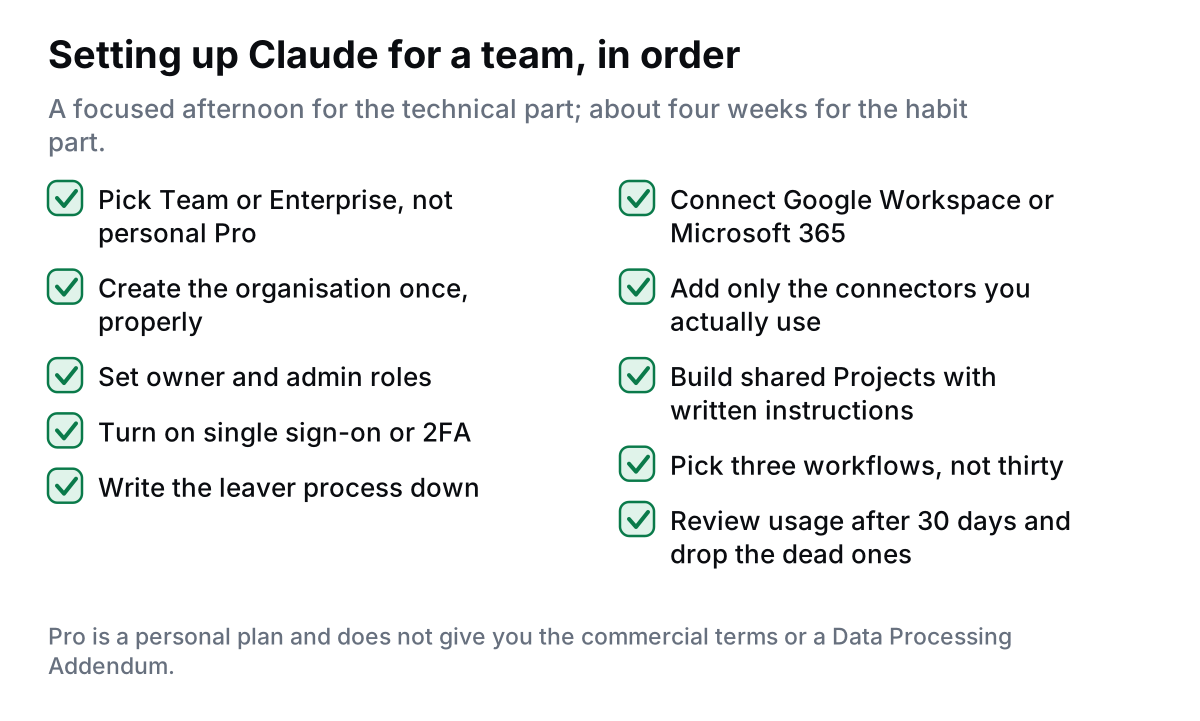
It is written for an Irish firm of roughly 3 to 30 people. Plan names, prices and connector lists were checked in August 2026 and change often, so verify the live pricing page before you buy. If you want the version with a consultant attached, see Claude for Small Business setup in Ireland, €1,750.
Which plan do you need to set up Claude for a small business team?
Three plans matter here. Checked August 2026:
- Pro is the individual plan, around $17–20 per month depending on billing. One person, no admin console, no shared workspace, and it sits under the consumer terms. Fine for a sole trader testing the water. Not fine for team or client data.
- Team is the smallest business plan: per-seat pricing (roughly $20 per standard seat per month on annual billing at the time of writing, more on monthly billing, with a higher premium seat tier), an admin console, shared Projects, and single sign-on. Anthropic has changed the seat minimum more than once, so check the current figure before you plan headcount.
- Enterprise adds domain capture, deeper SSO and identity controls, and larger context and usage allowances. Some of it is self-serve, some is sales-assisted.
The dividing line that matters for Irish firms is not features, it is contract. Team and Enterprise are commercial products: Anthropic states it does not train on business inputs by default, and the commercial terms bring in the Data Processing Addendum. Pro does not give you that footing. If customer or client personal data will ever touch the tool, start on Team. The detail is in is Claude GDPR compliant in Ireland.
A Claude Team setup in Ireland is therefore the default recommendation here. For a plain price comparison in euro, see Claude Team pricing in Ireland.
How do you create the organisation and invite users?
Do this in one sitting, from the account that should own the bill.
- Buy from a company email address on your own domain. Not a personal Gmail. The domain is what later lets you claim users and enforce sign-on.
- Name the organisation as the trading name on your invoices, so the billing record matches your accounts.
- Set two owners. One person leaving should never lock you out of the workspace. In a five-person firm, the owner and one other.
- Invite by email in one batch, and tell people it is coming. Unexpected invitations get ignored or reported as phishing.
- Assign roles. Most staff are members. Admins manage seats, billing and settings. Keep admin to two people; you can widen it later.
- Write the leaver step now. Add "remove from Claude" to the same checklist that removes email access. This is the control that fails most often in small firms.
How do you set up SSO, 2FA and data settings?
Three settings, ten minutes, and they cover most of what an insurer or a client questionnaire will ask about.
- Single sign-on. If you run Google Workspace or Microsoft 365, connect Claude to it so people sign in with the account you already control. Turning off one account then removes access everywhere.
- Two-factor authentication. If you are not using SSO, require 2FA for every seat. No exceptions for the owner.
- Data and training settings. On a business plan the default is no training on your inputs and outputs. Open the settings anyway, confirm it, and screenshot it for your file. Do the same with retention settings.
Then save a PDF of the commercial terms and the Data Processing Addendum on the day you accept them, and add Anthropic to your Article 30 record of processing. The full checklist lives on the Claude security and data page.
How do you connect Google Workspace, Microsoft 365 and your accounts tools?
Connect in order of value, and connect one at a time so you can see what changes.
First, the office suite. Google Workspace or Microsoft 365 gives Claude your mail, calendar and files. This is the connection that makes the daily workflows work, and it is also the one with the widest data reach, so decide who gets it. A common pattern is to enable it for the people doing customer correspondence and hold it back from shared or generic accounts.
Then the Claude for Small Business plugin. Anthropic launched this in 2026 as an install-and-go package of connectors and ready-made workflows. Checked August 2026, the connectors named by Anthropic are QuickBooks, PayPal, HubSpot, Canva, Docusign, Google Workspace and Microsoft 365, with others such as Slack available separately. It is a toggle in the product, not a project.
Rules of thumb for connecting accounts:
- Connect with a service or admin account you can revoke, not with the owner's personal login.
- Give read access before write access. Let it read HubSpot for two weeks before it creates anything.
- Never connect a payments tool to an unsupervised automated action. Drafting a refund note is fine. Issuing the refund is not.
- Keep a list of what is connected, by whom, with what scope. One page in your shared drive.
How do Projects and shared instructions work?
Projects are the single biggest difference between a team that gets value from Claude and one that does not. A Project holds reference files and a written instruction that applies to every conversation inside it. That means the same tone, the same rules and the same facts for everyone, instead of thirty private prompt styles.
Start with three Projects, no more:
- Customer replies. Files: your service list, pricing, opening hours, refund policy, ten past replies you were happy with. Instruction: house tone, what to never promise, when to escalate to a person.
- Proposals and quotes. Files: your template, three won proposals, your rate card. Instruction: structure, what needs a human price check.
- Internal admin. Files: process notes, supplier list. Instruction: summarise, do not decide.
Write the instruction as if you were briefing a new hire on their first morning. Short sentences. Say what to do, what to avoid, and when to stop and ask. Then have one person own each Project so the files stay current.
What are the first three workflows to set up?
Pick tasks that happen weekly, take real time, and have a person checking the output. Typical first three for a small Irish firm:
- Inbox triage and first-draft replies. Claude sorts the morning mail and drafts responses to the routine half. A person sends them.
- Meeting and call notes to actions. Paste or connect the notes, get a summary with owners and dates, push them into your task list.
- The monthly finance summary. With QuickBooks connected, a plain-language summary of what moved, what is outstanding and what needs chasing.
Measure the before time honestly for two weeks. If a workflow does not save at least an hour a week across the team, replace it rather than defend it.
Want it set up once, properly?
FMOps does Claude for Small Business setup in Ireland, €1,750: plan choice, DPA on file, admin and access controls, connected accounts, three working workflows, a one-page usage policy and staff training. Support from €600 a month. Start with the free Claude readiness check, or book a free call.
What goes in the AI usage policy?
One page, written in the words your staff use. It should answer six questions:
- What can go into Claude, and what must never (bank details, passwords, health information, anything under a client confidentiality clause).
- Which account to use, and that personal accounts are not for work.
- Who checks output before it reaches a customer.
- How to handle a mistake, without blame.
- Who to ask when unsure.
- Where the connected-accounts list lives.
Get everyone to read it and record that they did. That record is worth more than the policy itself if a question ever comes.
How do you train the team?
Two sessions beat one long one. The first, 45 minutes, live, with everyone's real work open: each person does one task in Claude and sees the result. The second, two weeks later, is where the value is: people bring what went wrong, and you fix the Project instructions on the spot.
Nominate one champion who is not the owner. Adoption in small firms follows the person beside you, not the person above you.
What should you review after 30 days?
Sit down with five numbers and one question.
- Seats bought against seats actually used weekly. Cut or reassign the idle ones.
- Which of the three workflows survived.
- Hours saved, estimated by the people doing the work, not by you.
- Any near miss: something pasted that should not have been, or output sent without review.
- Connectors still connected that nobody uses. Disconnect them.
The question: what is the fourth workflow? Add one thing a month. Firms that try to automate everything in month one usually end up back in the inbox by month three.
Where does a consultant fit?
Honestly, plenty of teams can do all of the above themselves; Anthropic has made the install part easy on purpose. The parts that go wrong unaided are workflow design, safe account connection, the GDPR and DPA paperwork, and getting staff to actually change habit. I have written the straight answer in do I need a Claude consultant. If your practice handles client financial records, the vertical detail is in Claude for accountants in Ireland. For the tool choice itself, compare Claude and ChatGPT or Claude and Microsoft Copilot. For what a paid engagement looks like week by week, see what a Claude setup looks like.
Frequently asked questions
Do I need Claude Team or is Pro enough for a small business team?
Pro is a single-user personal plan with no admin console and no shared workspace, and it sits under the consumer terms. Team is the smallest plan with an admin console, shared Projects, single sign-on and the commercial terms that bring in the Data Processing Addendum. If more than one person uses it, or if any customer data is involved, use Team. Checked August 2026.
How long does it take to set up Claude for a small business team?
The technical part, buying the plan, creating the organisation, inviting users, turning on sign-on controls and connecting Google Workspace or Microsoft 365, takes an afternoon. Building useful shared Projects and getting people to change habit takes about four weeks. Plan for the second part, not the first.
Which tools can Claude connect to on the Claude for Small Business plugin?
Checked August 2026, Anthropic lists QuickBooks, PayPal, HubSpot, Canva, Docusign, Google Workspace and Microsoft 365, with connectors such as Slack available alongside them. The list grows, so check the current one before you plan a workflow around a specific tool.
Does Claude support single sign-on and two-factor authentication?
Single sign-on is available on Team and Enterprise plans, and Enterprise adds domain capture and deeper identity controls. If you are not using single sign-on, require two-factor authentication on every seat, including the owner's.
What should we not paste into Claude?
Passwords, full card or bank details, anything covered by a client confidentiality clause you have not cleared, and special category data such as health records unless you have assessed the risk first. Put the list in your one-page usage policy so nobody has to guess.
Do we need to tell customers we use AI?
You should name the category of processor in your privacy notice, say what data is processed and why, state the transfer safeguard and retention, and confirm a person reviews decisions that affect a customer. You do not need to name the product in every email.

Fionn Murphy runs FMOps, a one-person consultancy in Waterford, Ireland. He helps small Irish businesses get found in AI search, ship simple websites, automate admin, and set up Claude for their teams. LinkedIn · Book a free 30-minute call